epx
Python client for running simulations within the Epistemix Platform.
Contents
- Creating Your epx-client Config File
- High-level API
- Configuring a Job
- Executing a Job
- Viewing Results
- Revisiting a Previously Executed Job
- Retrieving Results for a Previously Executed Job
- Retrieve a List of Valid Job Keys
- Retrieve a List of Runs Associated with a Particular Job
- Deleting a Job
- Stopping a Job
- Retrieve a List of Jobs for the Current User
- Retrieve a List of Attributes
- Delete a Attribute
- Upload a Attribute
- Get a status upload of Attribute
- Migrating From 0.2.0 to 1.0.0
Creating Your epx-client Config File
A new user will need to log in to the Epistemix Platform and create a new token to use with the remote execution system. Once at the Epistemix Platform Home page, a user will click the "Regenerate" button to create a new token.
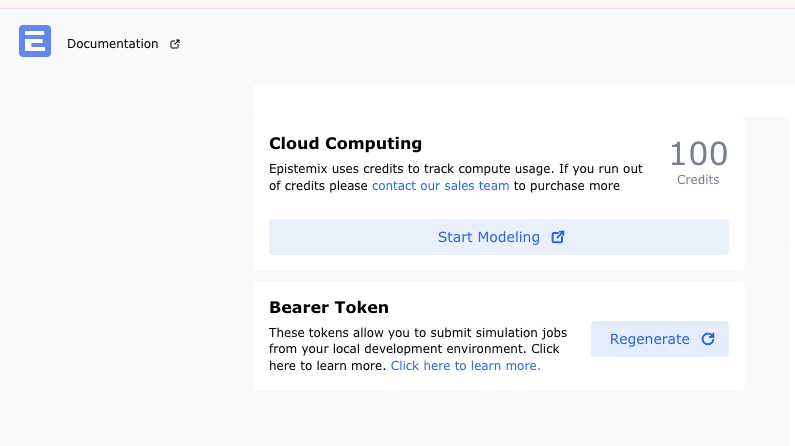
When the user successfully creates a new token, they will need to click the "Copy" button to copy the newly created token.
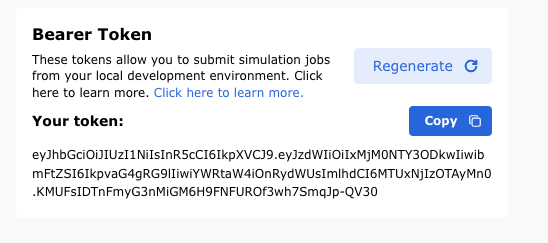
Once the token is copied to their clipboard, the user will create a new file at the path ~/.epx/config.json with the following contents:
{
 "api-url": "https://platform.epistemix.com/v1",
 "bearer-token": "<insert token from clipboard here>"
}
High-level API
The high-level API is the primary interface for users of epx. It is designed to provide a convenient interface for configuring and executing collections of simulation runs ("jobs") and managing their results.
The core concept in the high-level API is the job, implemented by the Job class. This represents a collection of simulation runs that share a common FRED model entry point, FRED version, and compute instance size.
Configuring a Job
In this example, we assume that you are developing a model in the ~/my-model directory within the Platform IDE, and that the FRED model entry point is ~/my-model/main.fred.
First, import the following:
Now, create an iterable of FREDModelConfig objects that define each run in your job:
model_configs = [
    FREDModelConfig(
        synth_pop=SynthPop("US_2010.v5", ["Jefferson_County_PA"]),
        start_date="2024-01-01",
        end_date="2024-01-31",
        model_params={"sample_parameter": 5},
        seed=12345,
    ),
    FREDModelConfig(
        synth_pop=SynthPop("US_2010.v5", ["Allegheny_County_PA"]),
        start_date="2024-02-01",
        end_date="2024-02-29",
        model_params={"sample_parameter": 10},
    ),
]
Note that the start_date and end_date parameters are optional and, if not given, will default to the corresponding values given in the FRED model code. The seed parameter is also optional and, if not given, a seed will be randomly generated for you.
Often it is useful to run a job with a range of values for a given model—known as a parameter sweep. This can be achieved using the FREDModelConfigSweep class:
model_configs = FREDModelConfigSweep(
    synth_pop=[
        SynthPop("US_2010.v5", ["Jefferson_County_PA"]),
        SynthPop("US_2010.v5", ["Allegheny_County_PA"])
    ],
    start_date=["2024-01-01"],
    end_date=["2024-01-31", "2024-02-29"],
    model_params=[{"sample_parameter": 5}, {"sample_parameter": 10}],
    n_reps=2,
)
This generates configuration for a job with 16 runs: two repetitions (each with different simulation seeds) of each combination of two synthetic populations, one start date, two end dates, and two values of the sample_parameter.
Whether you specify FREDModelConfig objects explicitly or use FREDModelConfigSweep, define your job as follows:
job = FREDJob(
    program="main.fred",
    config=model_configs,
    key="my-job",
    fred_files=["model/main.fred", "model/secondary-file1.fred", "model/secondary-fred-file2.fred"],
    ref_files={"data/my-data.csv": "data/my-data.csv", "data/my-text-file.txt": "data/my-text-file.txt"},
    size="large",
    fred_version="11.0.1"
)
The optional size parameter specifies the compute instance size for the run. Permissible values are hot (the default) or any of those listed in the Platform documentation. The optional fred_version parameter defaults to latest but can also specify versions like 10.1.1 or 11.0.1.
The fred_files argument accepts paths to FRED model files needed for simulation. These files will be concatenated into one main .fred file for remote execution.
The ref_files argument accepts a dictionary where keys are filenames on the remote system and values are local paths. These files will be copied to the remote execution system.
Executing a Job
To execute the job specified above, run:
Here, the optional time_out parameter throws a RuntimeError if job status is not done after timeout.
The max_retries parameter is optional. When a job execution fails, this is the maximum number of retries for the job. If not provided, the value will be read from the config.json file. If unavailable, the default is 3.
The backoff_factor parameter is optional. Factor by which the sleep time is increased.If not provided, the value will be taken from the config.json file. If not provided, the value will be read from the config.json file. If unavailable, the default is 2.
The force_overwrite parameter is optional. Whether to remove existing files if the output directory contains any.If not provided, the value will be taken from the config.json file. If not provided, the value will be read from the config.json file. If unavailable, the default is False.
Check job status using:
or
Possible values: NOT STARTED, RUNNING, ERROR, QUEUED and DONE.
Access logs for an executing job with:
A summary of runs associated with each parameter combination can be accessed via:
Viewing Results
Once complete, access results through the job.results attribute. All methods return either a pandas.DataFrame or pandas.Series.
State Occupancy
Access counts of agents in each state using:
Population Size
Get time series of population size at day's end:
Epidemiological Weeks
Map simulated days to epidemiological weeks:
Dates
Map simulated day numbers to calendar dates:
Print Output
Access output from FRED's print action:
CSV Output
Access output written by FRED's print_csv action:
File Output
Access output written by FRED's print_file action:
Numeric Variable
Get time series of numeric variable value:
List Variable
Get time series of list variable value:
Use optional argument for wide format display:
Table Variable
Get time series of table variable value:
Network
Get a series of network objects from a job:
The network_name (str, required): The name of the FRED network.
The is_directed (bool, optional, default: True): Whether the network is directed.
The sim_day (int, default: None): The simulation day to retrieve the network. If None, returns the network for the final simulation day.
List Table Variable
Get time series of list table variable value:
Use wide format display option:
Revisiting a Previously Executed Job
To obtain a previously executed job object (e.g., for results access):
Retrieving Results for a Previously Executed Job
Retrieve results for an executed job using:
jobResults = FREDJob.from_key("my-job")
jobResults.results.download(jobResults.key)
jobResults.results.dates()
Retrieve a List of Valid Job Keys
Retrieve valid job keys for loading completed jobs from previous sessions:
Retrieve a List of Runs Associated with a Particular Job
Retrieve runs associated with any particular job using:
Deleting a Job
Delete data for an executed job by calling:
To suppress confirmation prompts (e.g., for multiple jobs), pass interactive=False.
Stopping a Job
Stop the running job by calling
Retrieve a List of Jobs for the Current User
Get list of jobs for the current user.
The name (str, optional): The name of the job to filter.
The start_date (datetime | str, optional): Filter jobs that started after this date (format: "YYYY-MM-DD").
The end_date (datetime | str, optional): FFilter jobs that ended before this date (format: "YYYY-MM-DD").
Retrieve a List of Attributes
Get list of attributes.
The attribute_set (str, optional): The name of the attribute set to retrieve.
The max_retries (int, optional): Maximum number of retry attempts. If not provided, the value will be read from the config.json file. If unavailable, the default is 3
The backoff_factor (int, optional): The factor by which the wait time increases between retries. If not specified, the value will be read from config.json. If unavailable, the default is 2.
Delete a Attribute
Delete a attributes.
job.delete_attribute(
    attribute_set="attribute_set",
    attribute_name="attribute_name",
    version=1,
    max_retries=3,
    backoff_factor=3
)
The attribute_set (str, required): The name of the attribute set to delete.
The attribute_name (str, required): The name of the attribute to delete.
The version (int, required): The version of the attribute to delete.
The max_retries (int, optional): Maximum number of retry attempts. If not provided, the value will be read from the config.json file. If unavailable, the default is 3
The backoff_factor (int, optional): The factor by which the wait time increases between retries. If not specified, the value will be read from config.json. If unavailable, the default is 2.
Upload a Attribute
Upload/create a attributes.
job.upload_attribute(
    spec={
        "data_path": "path/to/data.csv",
        "name": "attribute_name",
        "version": 1,
        "description": "Description of the attribute",
        "generation_method": {
            "type": "direct",
            "entity_type": "agent",
            "match_attributes": [],
        },
    },
    attribute_set="attribute_set",
    synth_pops=['0'],
    max_retries=3,
    backoff_factor=3
)
The spec (required): The detailed specifications for the attribute to be uploaded.
The attribute_set (str, required): The name of the attribute set to uploaded.
The synth_pops (list[str], required): A list of synchronized population sets, e.g., ["0"].
The max_retries (int, optional): Maximum number of retry attempts. If not provided, the value will be read from the config.json file. If unavailable, the default is 3
The backoff_factor (int, optional): The factor by which the wait time increases between retries. If not specified, the value will be read from config.json. If unavailable, the default is 2.
Get a status upload of Attribute
Get a status upload of Attribute.
The upload_id (str, required): The upload_id is returned from the upload attribute.
The max_retries (int, optional): Maximum number of retry attempts. If not provided, the value will be read from the config.json file. If unavailable, the default is 3
The backoff_factor (int, optional): The factor by which the wait time increases between retries. If not specified, the value will be read from config.json. If unavailable, the default is 2.
Migrating From 0.2.0 to 1.0.0
When migrating from version 0.2.0 to 1.0.0:
* Results are stored in ~/.epx/results-cache, not in directories passed via results_dir.
* Any FRED files containing include statements will fail since all FRED files are concatenated.
* Files referenced in models (e.g., CSV or TXT) must be included in the ref_files.
* A config file must be created at ~/.epx/config.json. See Creating Your epx-client Config File.