epx
Python client for running simulations within the Epistemix Platform.
Contents
- Creating Your epx-client Config File
- High-level API
- Configuring a Job
- Executing a Job
- Viewing Results
- Revisiting a Previously Executed Job
- Retrieving Results for a Previously Executed Job
- Retrieve a List of Valid Job Keys
- Retrieve a List of Runs Associated with a Particular Job
- Deleting a Job
Creating Your epx-client Config File
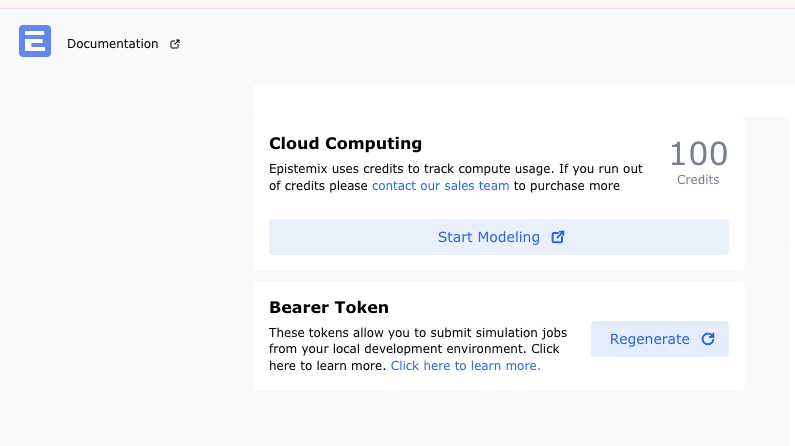
A new user will need to log in to the Epistemix Platform and create a new token to use with the remote execution system. Once at the Epistemix Platform Home page, a user will click the "Regenerate" button to create a new token.
When the user successfully creates a new token, they will need to click the "Copy" button to copy the newly created token.
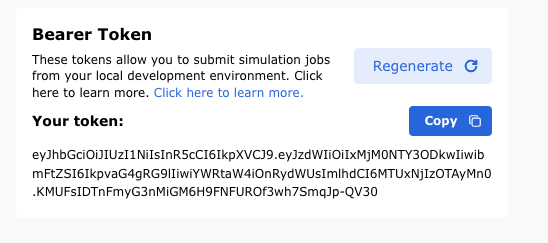
Once the token is copied to their clipboard, the user will create a new file at the path ~/.epx/config.json with the following contents:
{
    "api-url": "https://platform.epistemix.com/v1",
    "bearer-token": "<insert token from clipboard here>"
}
High-level API
The high-level API is the primary interface for users of epx. It is designed to provide a convenient interface for configuring and executing collections of simulation runs ("jobs") and managing their results.
The core concept in the high-level API is the job, implemented by the Job class. This represents a collection of simulation runs that share a common FRED model entry point, FRED version, and compute instance size.
Configuring a Job
In this example, we assume that you are developing a model in the ~/my-model directory within the Platform IDE, and that the FRED model entry point is ~/my-model/main.fred.
First, import the following:
Now, create an iterable of ModelConfig objects that define each run in your job:
model_configs = [
    ModelConfig(
        synth_pop=SynthPop("US_2010.v5", ["Jefferson_County_PA"]),
        start_date="2024-01-01",
        end_date="2024-01-31",
        model_params={"sample_parameter": 5},
        seed=12345,
    ),
    ModelConfig(
        synth_pop=SynthPop("US_2010.v5", ["Allegheny_County_PA"]),
        start_date="2024-02-01",
        end_date="2024-02-29",
        model_params={"sample_parameter": 10},
    ),
]
Note that the start_date and end_date parameters are optional and, if not given, will default to the corresponding values given in the FRED model code. The seed parameter is also optional and, if not given, a seed will be randomly generated for you.
Often it is useful to run a job with a range of values for a given model—known as a parameter sweep. This can be achieved using the ModelConfigSweep class:
model_configs = ModelConfigSweep(
    synth_pop=[
        SynthPop("US_2010.v5", ["Jefferson_County_PA"]),
        SynthPop("US_2010.v5", ["Allegheny_County_PA"])
    ],
    start_date=["2024-01-01"],
    end_date=["2024-01-31", "2024-02-29"],
    model_params=[{"sample_parameter": 5}, {"sample_parameter": 10}],
    n_reps=2,
)
This generates configuration for a job with 16 runs: two repetitions (each with different simulation seeds) of each combination of two synthetic populations, one start date, two end dates, and two values of the sample_parameter.
Whether you specify ModelConfig objects explicitly or use ModelConfigSweep, define your job as follows:
job = Job(
    program="main.fred",
    config=model_configs,
    key="my-job",
    fred_files=["model/main.fred", "model/secondary-file1.fred", "model/secondary-fred-file2.fred"],
    ref_files={"data/my-data.csv": "data/my-data.csv", "data/my-text-file.txt": "data/my-text-file.txt"},
    size="large",
    fred_version="11.0.1"
)
The optional size parameter specifies the compute instance size for the run. Permissible values are hot (the default) or any of those listed in the Platform documentation. The optional fred_version parameter defaults to latest but can also specify versions like 10.1.1 or 11.0.1.
The fred_files argument accepts paths to FRED model files needed for simulation. These files will be concatenated into one main .fred file for remote execution.
The ref_files argument accepts a dictionary where keys are filenames on the remote system and values are local paths. These files will be copied to the remote execution system.
Executing a Job
To execute the job specified above, run:
Here, the optional time_out parameter throws a RuntimeError if job status is not done after timeout.
Check job status using:
Possible values: NOT STARTED, RUNNING, ERROR, and DONE.
Access logs for an executing job with:
A summary of runs associated with each parameter combination can be accessed via:
Viewing Results
Once complete, access results through the job.results attribute. All methods return either a pandas.DataFrame or pandas.Series.
State Occupancy
Access counts of agents in each state using:
Population Size
Get time series of population size at day's end:
Epidemiological Weeks
Map simulated days to epidemiological weeks:
Dates
Map simulated day numbers to calendar dates:
Print Output
Access output from FRED's print action:
CSV Output
Access output written by FRED's print_csv action:
File Output
Access output written by FRED's print_file action:
Numeric Variable
Get time series of numeric variable value:
List Variable
Get time series of list variable value:
Use optional argument for wide format display:
Table Variable
Get time series of table variable value:
List Table Variable
Get time series of list table variable value:
Use wide format display option:
Revisiting a Previously Executed Job
To obtain a previously executed job object (e.g., for results access):
Retrieving Results for a Previously Executed Job
Retrieve results for an executed job using:
jobResults = Job.from_key("my-job")
jobResults.results.download(jobResults.key)
jobResults.results.dates()
Retrieve a List of Valid Job Keys
Retrieve valid job keys for loading completed jobs from previous sessions:
Retrieve a List of Runs Associated with a Particular Job
Retrieve runs associated with any particular job using:
Deleting a Job
Delete data for an executed job by calling:
To suppress confirmation prompts (e.g., for multiple jobs), pass interactive=False.